

Organise your gift exchange in one place: set the exchange date, budget and privacy rules, run the draw and give participants their own panels with chats and wishlists – all inside a clear WordPress interface.
With Gift Shuffle & Secret Santa you set up a gift exchange that actually works: you add exclusions (e.g. couples, family members), draw fair pairs, enable anonymous 1:1 and group chats, and the system automatically handles email notifications. Everything happens in WordPress, including on the front end – via a simple shortcode.
How does the plugin make everyone happy?
The plugin automatically draws pairs and assigns each person exactly one recipient, respecting exclusions and making sure nobody gets themselves. In the WordPress panels, the admin sets the exchange date, budget and privacy rules, while participants see who they’re buying for, their 1:1 chats, the group chat room and their hint list. It saves real time, reduces stress and frees up more space for fun and team bonding.

And that’s just the beginning. Gift Shuffle & Secret Santa organises your entire gift exchange, communication and data. You can easily:
- set the budget per person, exchange date and data retention rules, then start the draw with a single click – with a guarantee of unique, valid pairs,
- enable anonymous 1:1 chats and a group chat with nicknames, plus a section for gift hints and shop links to make it easier to match people’s tastes,
- send automatic and bulk emails – from information about the assigned person, through hint updates, to alerts about new messages.
This way the whole game runs smoothly: everyone knows who they’re buying for, sees the budget and deadline, hints appear in the panel, and conversations – both private and group – remain anonymous and safe.
The result? Instead of chaos and manual spreadsheets, you get a clear system you can use for years – one that handles your entire gift exchange, whether it’s Secret Santa, Christmas or any other occasion.
Key features that truly make a difference
Automatic pairing
One click and everyone gets their person to gift. The system makes sure nobody draws themselves and that all exclusions are respected without overwriting existing pairs.
Participant list
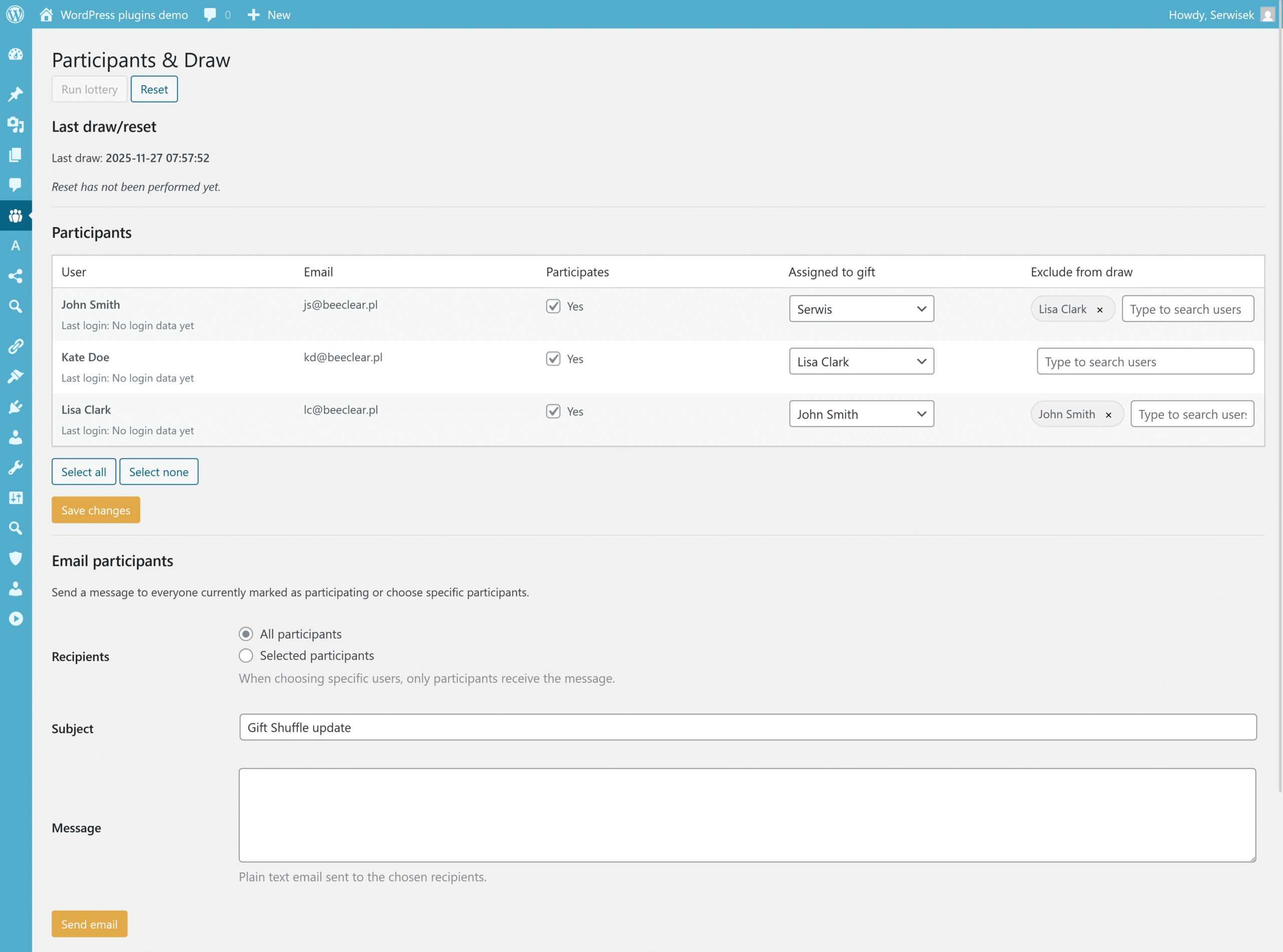
You work directly on your WordPress user list: tick who’s taking part, exclude specific people or pairs and see a full, clear line-up before you run the draw.
Anonymous chats
1:1 chats between the “Santa” and the recipient are fully anonymous, with no usernames or emails shown. The system refreshes conversations automatically, and new messages can trigger email alerts.
Gift hints
Each participant can save their “hints”: what they like, what they don’t want and any gift ideas they already have. Changes can automatically trigger an email to their Santa, which speeds up decision-making.
Reset and new seasons
New season? Clear assignments with a single click, optionally wipe conversations, and let the chat history show clear separators so different editions never get mixed up.
Email notifications
Automatic emails after the draw, when hints are updated, and when new messages appear in 1:1 or group chats. Participants can decide in their panel which notifications they want to receive.
Privacy control
You decide how long to store data and chats, and if needed you can delete everything with a single click after deactivation. Full fun, zero spoilers and compliance with your privacy policy.
A boost of ideas
A group chat with random nicknames and a gift ideas widget (e.g. Amazon, Allegro) let everyone share inspiration and links – including with your affiliate tags, if you use them.
Reports and history
View draw results, up to 50 recent events, season markers, and export/import data to a JSON file – full order plus the option to move your configuration to another site.
Make your holiday planning better!
This tool combines automation with control: participant lists, drawing with exclusions, 1:1 and group chats, hints, seasons, event history and configuration export/import. Thanks to the shortcode you can show the participant panel on the front end, without giving users access to the admin area.
Gift Shuffle & Secret Santa was created for families, companies, schools and communities. You configure the budget, exchange date, language and interface texts to match your style – and the plugin takes care of the rest. Your event becomes predictable, safe and 100% managed inside WordPress.
Start using Gift Shuffle & Secret Santa
The plugin is easy to configure, works on the content layer and doesn’t interfere with your theme. You can add it to an existing site or build a separate holiday microsite. Set it up once – define budget, date, rules and texts – and every year it will run your Secret Santa and gift exchanges according to your scenario.
Frequently asked questions
- How does the draw work and can someone get themselves?
- The draw assigns each participant exactly one person to gift, prevents anyone from drawing themselves, and respects all exclusions you set (e.g. couples, family members, a specific team). Existing pairs are not overwritten when you add new people, and if needed you can clear all assignments with a single click and run a new draw.
- Are the conversations fully anonymous?
- Yes. In 1:1 chats and in the group chat, participants never see each other’s data – they appear as anonymous users (for example with random nicknames). The administrator only sees that conversations and events took place, without message content and without exposing the identity of specific users.
- Will participants receive email notifications?
- Yes. The plugin can send emails after the draw (with information about who you are gifting), after saving or updating gift hints, and when new messages appear in 1:1 or group chats. Participants decide in their panel whether they want to receive notifications and to what extent.
- What if we want to start a new season?
- Use the season reset feature – it will remove current assignments, can wipe conversations (if you choose so), and will add clear separators in the chat history to distinguish between editions. In the “Danger zone” section there is also an option to wipe all plugin data completely if you need to start from scratch.
- Can we use gift suggestions and links to stores?
- Yes. Participants can enter their preferences and example gifts, and you can also use a widget with gift suggestions from services such as Amazon or Allegro. Links can include your affiliate tags if you work with affiliate programmes.