

Automate internal and external linking without manually clicking through your content. Define phrases, rules and priorities, and the plugin will automatically add the right links to posts, pages and selected widgets — exactly where they should strengthen SEO and make navigation easier for users.
With Internal & External Link Manager you build a consistent, logical link structure and shorten the path to key pages. You organise the flow of authority without the risk of “stuffing” anchors. As a result, you boost the visibility of long-tail content, reduce orphan pages and speed up the indexation of new materials.
What does the plugin do for SEO and GEO?
The plugin automatically detects defined phrases and turns them into links to the right internal pages or external URLs. It works on post and page content and selected widgets, and manually added links remain untouched — full control over exceptions stays in your hands. Your linking structure becomes predictable and consistent, and the editorial team gets hours of work back.
And that’s just the beginning. Internal & External Link Manager for WordPress organises linking not only on the SEO level, but also in terms of local information (GEO). With just a few simple rules you can:
- indicate local phrases, city or region names and connect them with the right offer pages or branches,
- create precise links to categories, products or services assigned to a specific location,
- drive traffic to local landing pages, directions maps or Google business listings,
- and do all of this without manually inserting hundreds of links — define a rule once and the plugin will handle the rest.
Thanks to this, your content starts working for both general search results and local queries. Google’s crawlers more quickly recognise relationships between pages, and users more easily reach the nearest branch or service in their region.
The result? Greater visibility in local results, a stronger position for long-tail keywords and less repetitive work for your editorial team and SEO specialists. Internal linking and local SEO become a repeatable, predictable and easily scalable process.
Key features that make a difference
Automatic linking
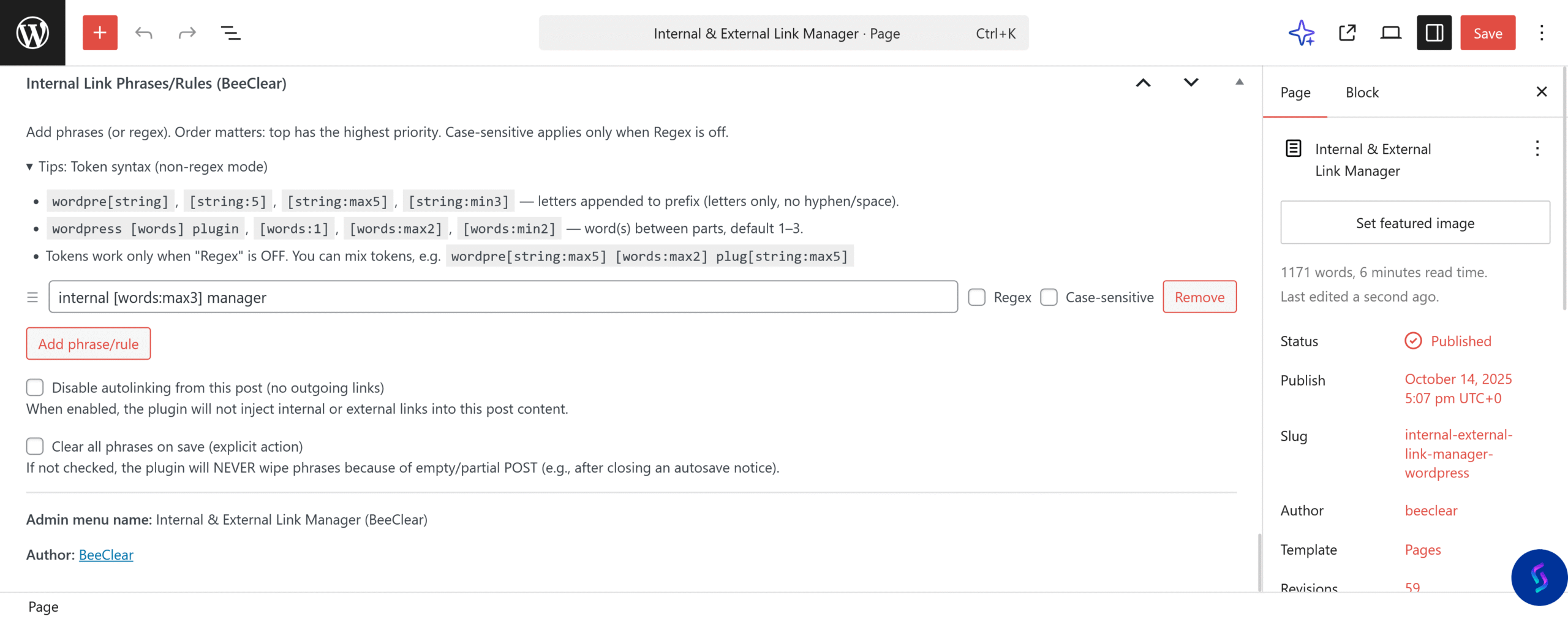
Point to words or phrases (also using regexes and tokens), and the plugin will automatically turn their occurrences into links in selected content types — without touching manually added links.
Phrase prioritisation
You decide which phrases have priority for linking. The order of rules translates directly into priority, so your most important pages always receive the most valuable anchors.
Linking rules
You don’t have to enter every inflected form of a keyword. Use the [words] and [string] tokens and regular expressions to cover natural variants of phrases and whole expressions with a single rule.
Intensity control
Set how often specific words should be linked and how many links from one rule can appear on a single page. With limits in place you avoid over-optimising your content.
Link templates and attributes
You define the rel attributes, title, aria-label and CSS classes for internal and external links. This keeps links consistent, safe and friendly for both users and screen readers.
Rule scope and content types
For each rule you decide which content types it should apply to and which specific posts (IDs) to exclude. You have full control over where automatic links appear.
Element exclusions
You freely indicate HTML tags (e.g. h2, li) and elements where the plugin should skip link generation. This protects headings, menus and navigation modules from excessive linking.
External linking
Create separate rules for links pointing outside your site: set destination URLs, rel attributes, how they open in new tabs and link styling — perfect for documentation, partners or manufacturer websites.
Reports and previews
The index panel shows the number of phrases, targets and link distribution across the site. You can see which content is most heavily interlinked and where it’s worth adding more connections, while rebuilding the index with a single click immediately refreshes your linking structure.
Make your website better!
This tool combines automation with full control: phrase priorities, link limits, custom link templates, accessibility rules, content type management and contextual exclusions. As a result, you tidy up your information architecture, boost the visibility of long-tail keywords and shorten the user’s path to their goal — without manually editing thousands of paragraphs.
Internal & External Link Manager was built for people who want to combine strong SEO with a comfortable workflow. Every rule is configurable and linking happens exactly according to your guidelines. Your content structure becomes logical and predictable, search engine bots index pages more efficiently and users easily reach where they should go — without chaos and unnecessary clicks.
Start using Internal & External Link Manager
The plugin is easy to configure, works at the content level and does not overwrite manually added links. Configure global rules once, add phrases to key posts and the plugin will consistently organise linking across the whole site — from the blog and sales pages to your knowledge base.
Frequently asked questions
- What is internal linking and why use it in SEO?
- Internal linking is a network of links connecting pages within a single website. It helps users and search engine crawlers understand the structure of your site, shortens the path to key content and allows you to deliberately distribute authority between pages. Well-designed internal links strengthen long-tail keywords, make it easier to index new articles, categories or products and reduce the number of orphan URLs. With contextual links you build a topic map, organise semantic relationships and naturally extend the user journey without aggressive CTAs. It’s also the safest area of link optimisation — you have full control over the anchor, placement and intent, and the effects compound over time.
- How do you plan an internal linking structure in a large site, e.g. an online store?
- Start by organising your information model: define pillar pages and their assigned topic clusters so that each category has clearly defined supporting content. In e-commerce, the key paths are category → subcategory → product page, reinforced by breadcrumb navigation and contextual links in descriptions. Make sure the path to priority pages is short (ideally 2–3 clicks) and that links are placed in clean HTML, not generated exclusively by scripts. In blog content, link upwards to categories and sideways to related guides, varying the anchors to avoid cannibalisation. Faceted navigation and parameters require careful handling of canonicals and indexation so signals aren’t diluted. Combine automated linking (e.g. with phrase rules) with manual curation on business-critical pages and regularly audit click depth and orphan pages.
- How many internal links per page is optimal and where should you place them?
- There’s no single “magic” number — what matters is usefulness and context. In informational content, a handful to a dozen or so contextual links usually works well, distributed in the lead and key paragraphs so they naturally develop the topic and lead to pillar or in-depth pages. In commercial sites, some links are provided by menus, filters and “related products” modules, but it’s worth adding manually curated blocks that guide users deeper into the funnel. Favour descriptive anchors close to user queries, and let the first link to a given URL be the most precise. Avoid repeating identical links in short intervals and unnatural chains of keywords. If you use automation, leverage per-page limits and element exclusions to keep a balance between visibility and reading comfort.
- How do you measure the impact of internal linking: which metrics really matter?
- The most important metrics connect crawling, indexation and business results. After changing your linking, watch for: a decrease in average click depth to target pages, an increase in the number of indexed URLs and a lower share of orphan pages. Check whether new content is discovered faster and whether signals aren’t being scattered across duplicates. On the results side, monitor visibility and clicks for long-tail queries, especially those assigned to pages that received additional links. Analyse user paths: do contextual links shorten the route to the goal, improve engagement and support conversions? A good practice is to compare periods before and after implementation on consistent page groups and to account for indexation cycles, as the effects of internal linking build up gradually.
- The most common internal linking mistakes — and how do you fix them without risking indexation?
- Typical issues include: too many links with generic anchors (“click here”), overly deep structures, duplicate parameterised URLs, links hidden behind interactions or marked nofollow and a lack of consistent breadcrumbs. Start fixing things by simplifying your architecture and defining pillar pages to which clear, descriptive anchors lead. Reduce thin and duplicate URLs by setting canonical versions and directing links precisely to them. Replace automatic “random/related” modules with more controlled blocks wherever you care about precise authority flow. Make sure key links are visible in HTML and available without JavaScript, and that internal links are not using the nofollow attribute by default. For larger changes, roll out corrections in stages while monitoring indexation and traffic to avoid sudden visibility swings.