
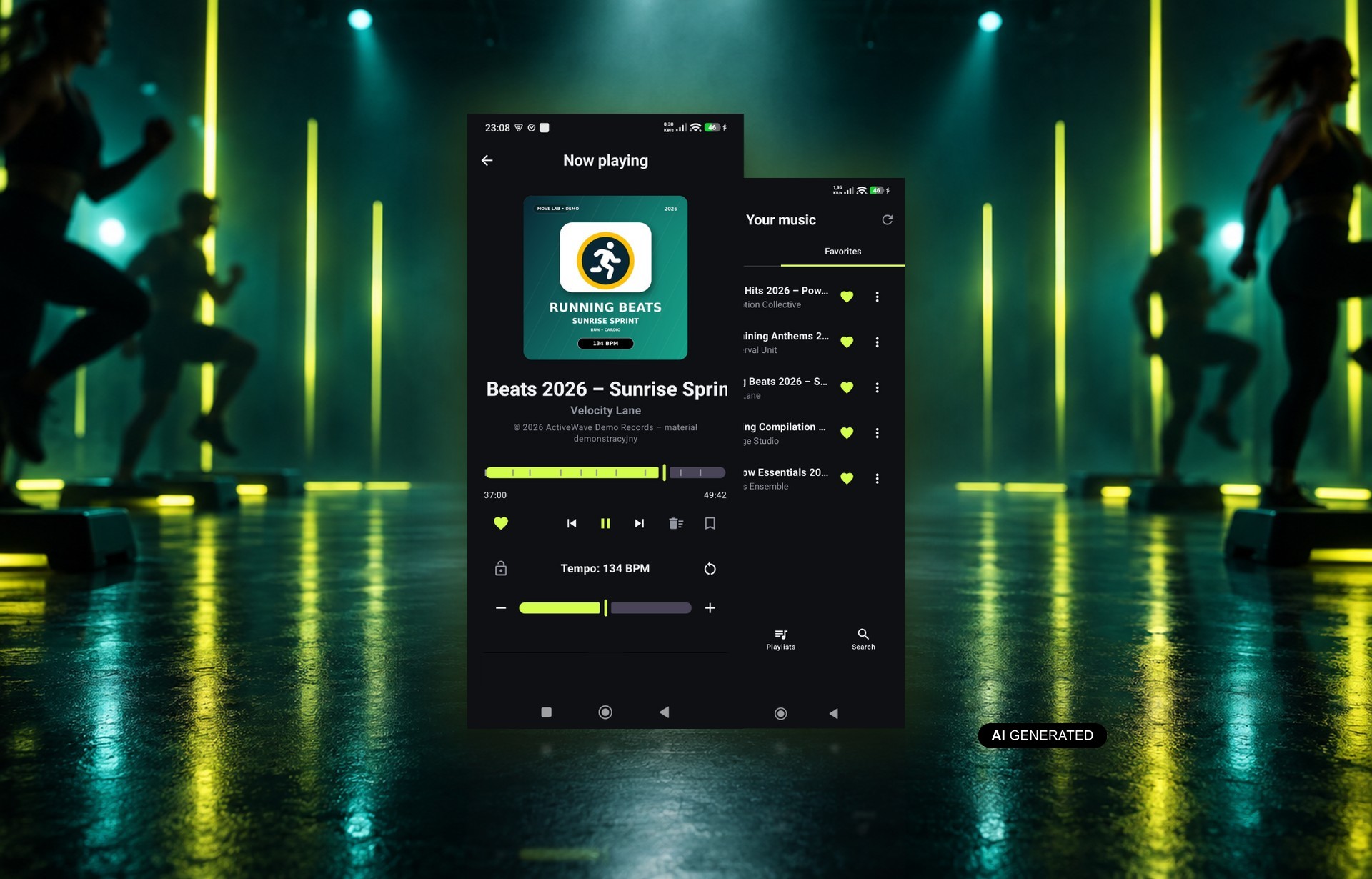
TempoCue is a free BeeClear app for Android — a music player built for group fitness instructors. Its core feature locks one target tempo for an entire playlist. Every track then plays at the same rhythm through the whole class block. See why a steady tempo makes such a difference to how a workout flows, and how the app takes work off the instructor’s plate on the floor.
Table of contents
- Why does music tempo matter so much for a fitness instructor?
- How does a steady tempo affect technique and exercise safety?
- What is BPM, and how do you set it in TempoCue?
- Does changing the tempo distort how the tracks sound?
- How does TempoCue make it easier to run a class?
- What are bookmarks in tracks and mixes good for?
- How do you build playlists for different parts of a workout?
- What does TempoCue remember for each playlist?
- How do you start running classes with TempoCue?
Why does music tempo matter so much for a fitness instructor?
Music tempo is the metronome for a whole fitness class. It sets the speed of every step, squat and swing, and the group follows it almost on reflex. When one track after another has a different rhythm, the exercises jump around with them. Participants lose the beat, and the instructor keeps correcting the movement by voice.
A steady tempo, in turn, brings predictability. It’s easier to call the next move ahead of time when you know exactly when the next beat lands. The group stays together, and newcomers pick up the routine faster. A constant rhythm keeps the class flowing without friction.
How does a steady tempo affect technique and exercise safety?
A steady tempo helps participants keep correct technique through the whole block of exercises. A track that’s too fast shortens the movement and tempts people into sloppy reps. One that’s too slow lowers the intensity, so the workout loses its planned character. A constant rhythm lets participants focus on the quality of the movement instead of just keeping up.
That leaves the instructor more attention for the people in the room. They can correct knee or back position instead of fighting the playlist. It’s also easier to spot the people who need a gentler version of a move. In a full room, that’s a real difference in the quality of coaching.
What is BPM, and how do you set it in TempoCue?
BPM stands for beats per minute, and in TempoCue you set it for the whole playlist. This basic measure of a track’s tempo is the starting point for the lock. A higher value means faster tracks and livelier group movement; a lower one means a calmer pace.
The tempo control sits right on the playback screen. A slider with minus and plus buttons changes the BPM value, and a lock icon locks it in. From that point on, the app matches the speed of every track to the tempo you picked. You don’t need to hunt for songs with an identical rhythm or re-process files on a computer. All it takes is a playlist of your favorite tracks and one decision about tempo.
Does changing the tempo distort how the tracks sound?
Changing the tempo in TempoCue doesn’t distort how the tracks sound, because speed goes up or down without changing the pitch. The music speeds up or slows down while the vocals and instruments keep their natural character. You won’t hear a “sped-up tape” effect or overdriven bass. That matters a lot in the room, because the soundtrack is there to motivate, not to get a laugh. Participants hear familiar songs in a version matched to the workout.
How does TempoCue make it easier to run a class?
TempoCue makes running a class easier because it takes over watching the music and frees up your attention for the group. Before participants even walk into the room, you already have a playlist ready with the tempo locked. During the session, the app works in the background and doesn’t need you glancing at the screen.
You set the phone aside and focus on demonstrating the movement. Here’s what it actually does for you:
- keeps the screen on for the whole time it’s playing,
- lets you control the music from the phone’s lock screen,
- jumps you straight to a chosen part of the mix with a bookmark,
- plays files stored on the device, so a weak signal never interrupts the class.
What are bookmarks in tracks and mixes good for?
Bookmarks in TempoCue mark chosen spots in long tracks and mixes. One tap takes you back to the chorus, a strong entry point, or a calm stretch section. That’s handy when the group wants to repeat a sequence. It also helps when you need to shorten a block because time is running out. Without bookmarks, you’re left scrubbing by eye, usually at the worst possible moment. With them, the jump takes a second and doesn’t throw anyone off the rhythm.
How do you build playlists for different parts of a workout?
Playlists in TempoCue work best when built for specific parts of a workout. The warm-up can have a calmer tempo, the main block a faster one, and the cool-down a slower one again. Each list keeps its own settings, so you switch between them without any manual tuning. In effect, you write your intensity plan into the music itself, not just into your notes.
The same way, you can prepare separate sets for step, dance classes or a strength circuit. That kind of split keeps your whole week of classes organized. Monday’s step playlist never mixes with Wednesday’s dance tracks. You pick a list and start, because the tempo and the gaps are already saved.
What does TempoCue remember for each playlist?
TempoCue remembers each playlist’s target tempo and the exact gap between tracks. That means you never have to set up the app from scratch before the next class. Once a set is ready, you start it without any tweaks, week after week.
A fixed gap between tracks gives you a predictable moment to announce the next block. The group knows exactly how long they have to catch their breath. Here’s how session prep changes:
| Area | Without TempoCue | With TempoCue |
|---|---|---|
| Tempo across the list | changes with every track | constant for the whole class block |
| Setup before class | from scratch every time | remembered for the playlist |
| Gaps between tracks | random | exactly what you set |
| Finding a section | scrubbing by eye | jump to a bookmark |
| Access to music | depends on network for streaming services | files on the phone, works offline too |
How do you start running classes with TempoCue?
You can get started with TempoCue before your very next class. Download the app for free from Google Play, load your music onto your phone, and build a playlist from it. Then set your target tempo and lock it for the whole list.
In the room, all that’s left for you is leading the group. The tracks play at one steady rhythm, the screen doesn’t go dark, and no signal doesn’t break anything. A steady tempo does the rest – from the warm-up to the last rep.